top of page


Company
My Role
User and Product Research, Information Architecture, UX Design, Hi-fi Mockups, Interaction Design, Visual Design
Tools
Figma, Photoshop, Illustrator, Paper & Sharpie
Duration
7 days
Year
2023
Background
LinkedIn, established in 2002, is a global professional networking platform that enables individuals to connect, grow their careers, and share industry insights.
As part of their design challenge for the position of a Product Design intern, LinkedIn gave me this design challenge.
Overview
A design case study focusing on creating an immersive experience that facilitates college students in exploring and establishing connections with their classmates through LinkedIn.
Design Process
1
2
3
4
Empathize
Ideate
Design
Test
1. Empathize
The Problem
Students have a difficult time finding and connecting with their classmates online in order to start a meaningful conversation.
Where do I find my classmates?
Difficult to sort out profiles
What are the portals where I can connect with my classmates?

Difficult to initiate meaningful conversations
Limited alumni presence
Current Scenarios
To better understand the current situation, I went and spoke with my classmates about their experiences after receiving admission and wanting to connect with their future classmates in a variety of ways. Some ways the students connected with their classmates online included:
Searching for classmates on LinkedIn, and requesting to connect.
• Joining relevant groups on social media platforms like Facebook and WhatsApp.
• Participating in online forums or discussion boards provided by the institution.
• Utilizing the alumni tool on LinkedIn, to connect with alumni and current students of the same school or program.
• Joining virtual study groups or online collaboration tools like Google Docs, Discord, and Slack
• Attending virtual networking events organized by the school or institution.
• Emailing or messaging classmates through the contact information provided by the institution.
• After the university information sessions, search for and connect with seniors on LinkedIn.
Current Scenario (LinkedIn Search)
It was crucial for me to become familiar with LinkedIn's search functionality before interviewing students. This gave me the opportunity to not only write down any initial thoughts or usability issues I had but also to pinpoint specific steps in the process that I wanted to learn more about.

Stages
Searching for the
University Name
Exploring a profile
based on LinkedIn
Headline
Sending a
personalized message
Exploring information on their profile
Finding a common School Group
Searching for Alumni within the School Group
Thoughts
Overwhelmed by
the search results
Would they feel as if I am stalking them?
What should my
message contain to help me build a professional relationship with them?
Is there any other user flow by which I can access the Schools section?
Overwhelmed by the information overload
Difficult to navigation within multiple sections
Current Scenario (LinkedIn Groups)
I also wanted to explore how to access school groups in the current scenario, in order to connect with classmates

Stages
Navigating groups in the side menu
Exploring the groups
Thoughts
Found it difficult to find the ‘Groups’ section
Overwhelmed by the sheer number of groups
Exploring the Group Page
How can I filter and find my classmates in these groups?
User Interviews
I conducted six brief user interviews with undergrad and grad participants ranging in age from 19 to 32 and residing in the United States of America, India, and Australia to better understand the psychology of the users, their motivations, goals, and pain points.
I questioned them about the difficulties they have finding relevant classmates, the platforms they use and favor, as well as specific aspects of the classmates' search procedure.
I was interested in how their journey unfolded once they were accepted into a school and had to initiate online interactions with prospective classmates in order to forge lasting professional connections.

‘Discover & Connect’
As per the prompt, to design an experience that helps college students “discover and connect” to their classmates on LinkedIn. I specifically asked the users to define these terms so that I could understand what it really meant to them.
Discover
How do you discover your classmates online before ever meeting them?
Connect
How did you approach striking up a new dialogue? Do you think you could develop a meaningful connection with them virtually?
Assumption for this case study
"Classmates" refer to admitted students who are enrolled in a college program.
Key User Takeaways
1
Difficulty in finding the correct profile
With a large number of LinkedIn users, it can be difficult for students to find the correct profile of their classmates. They may have to sort through a lot of irrelevant profiles to find the person they are looking for.
2
Lack of information on the profileIf classmates have not updated or optimized their LinkedIn profiles, it can be difficult for students to find enough information about them to initiate a connection.
3
Limited engagement
Even if students are able to connect with their classmates, they may find it difficult to initiate and maintain meaningful conversations with them.
4
Privacy concerns
Some students may be hesitant to connect with their classmates on LinkedIn due to privacy concerns, and they may be unsure whether or not the profiles are genuine.
2. Ideate
User Journey Map
Scenario: Rachel, a recent UT Austin MSCS admission, wants to find and connect with her classmates on LinkedIn.

Direct & Indirect Competitors

Vision
"
A LinkedIn feature that acts as a single platform to help discover and connect college students and foster meaningful connections
"
Brainstorming User Flows
Based on the data & findings, I was able to hypothesize the important user flows and how users would engage with the features after creating the conceptual sketches and story boarding


3. Design
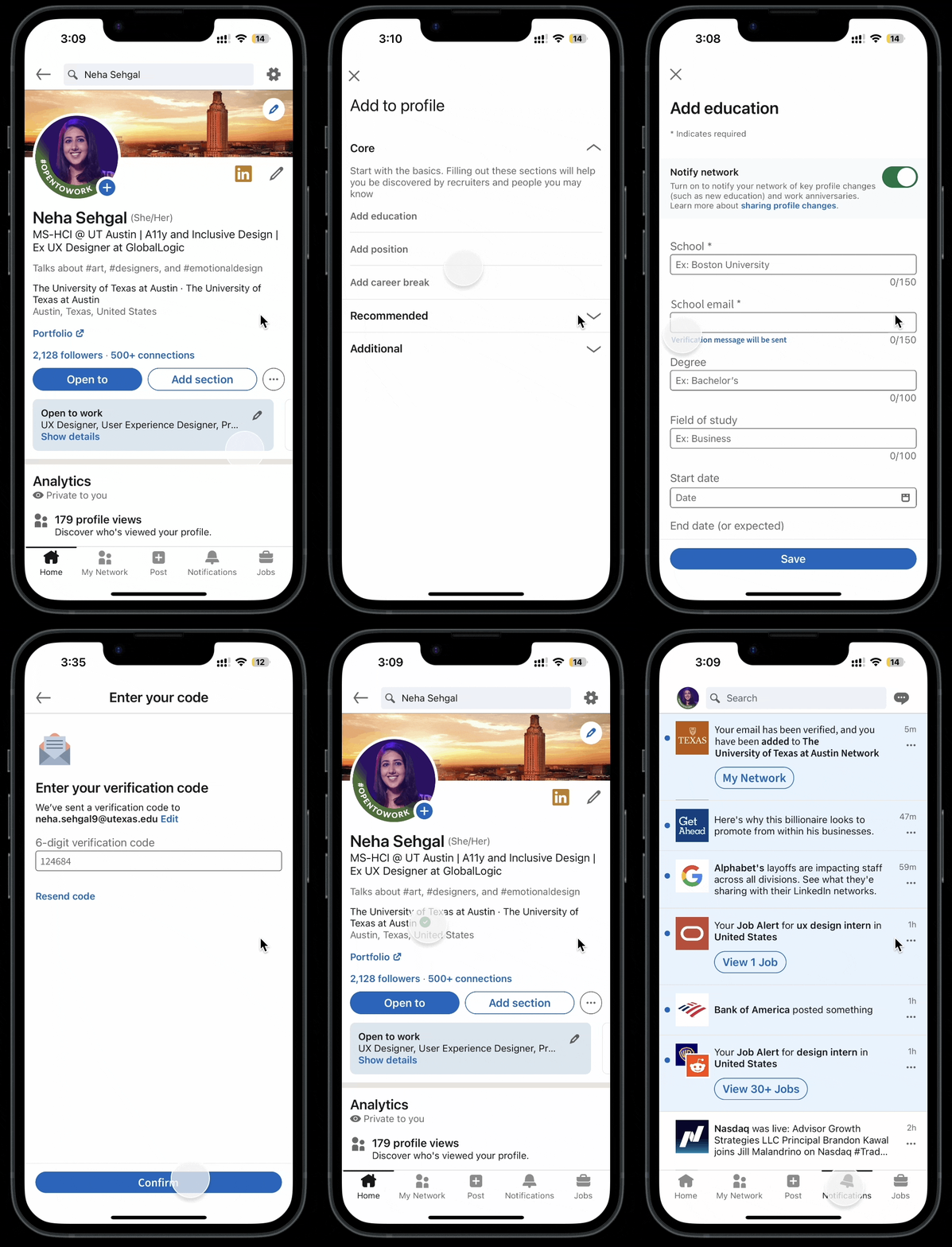
#1: How might we create a safe networking space for students?
Solution: Student Email Verification
Make it simple to confirm your status as a student while removing fake profiles. Students are less reluctant to begin connecting once they notice the verified symbol in front of the school name.

LinkedIn could collaborate with schools to improve the verification process through the use of two-factor authentication.

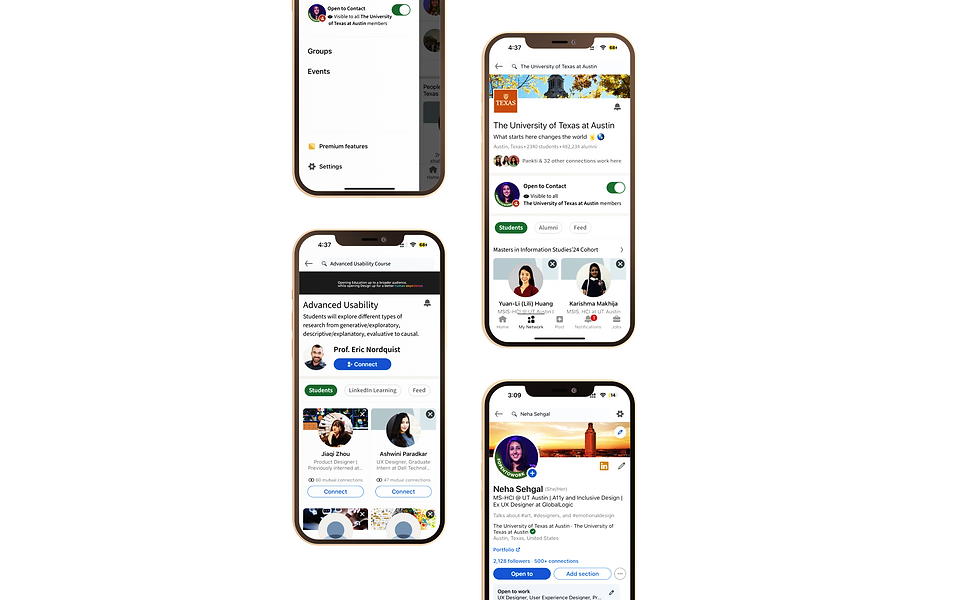
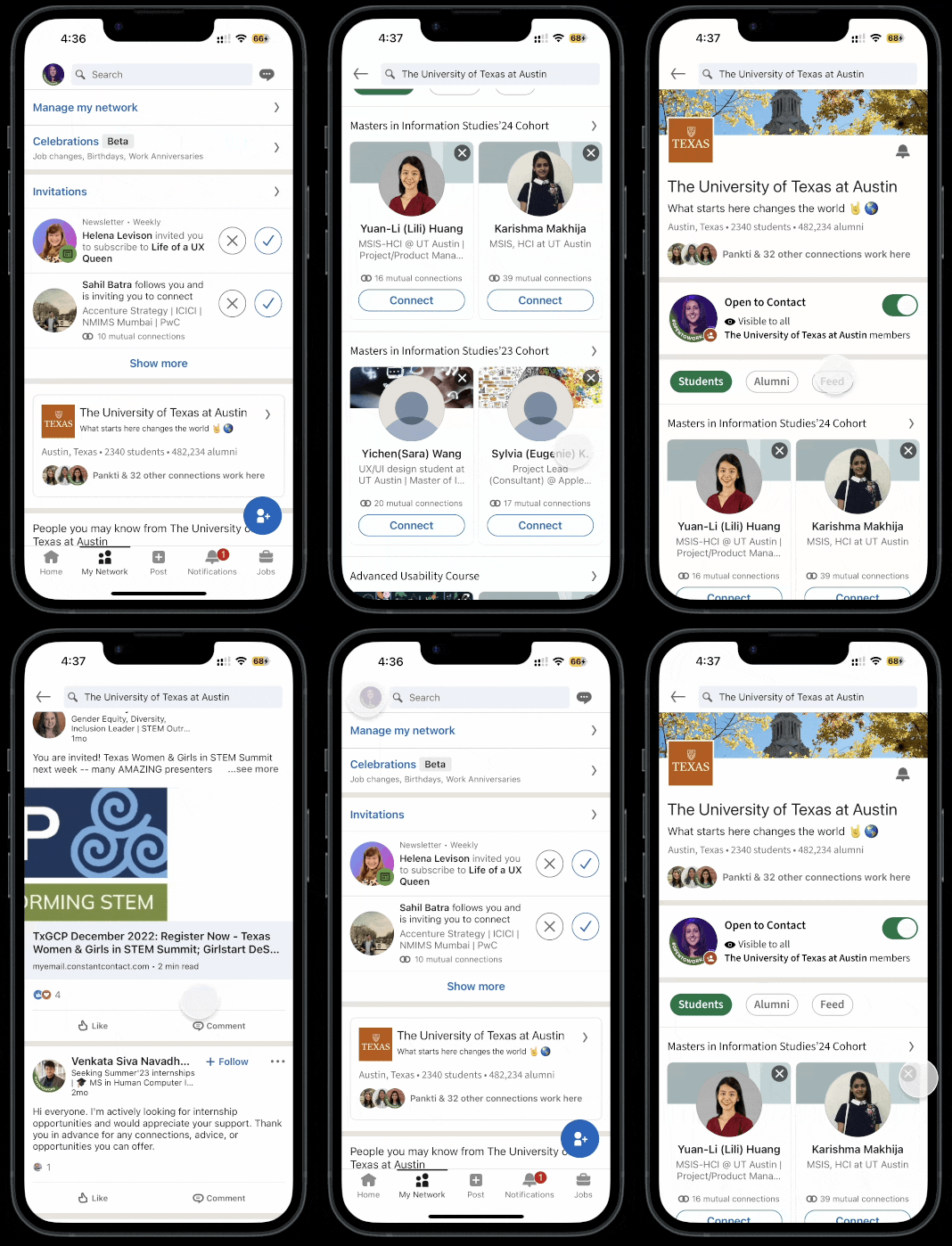
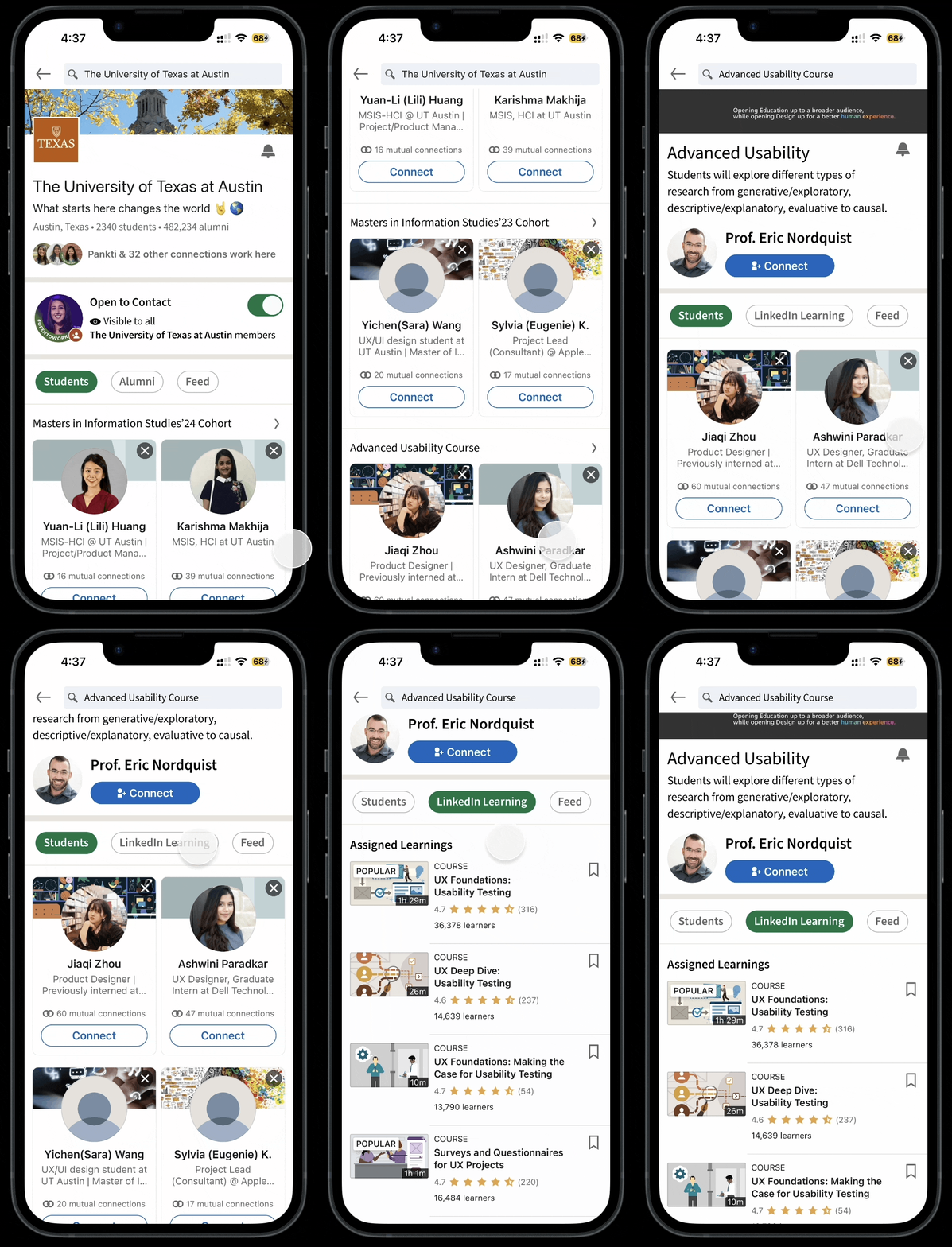
#2: How might we connect the students within the same school?
Solution: School Network
Students are added to their school's network, where they can view other students, juniors, seniors, and alumni as well as take part in a feed where they can ask their questions.
Due to the fact that each student has a unique LinkedIn headline, this also aids in recognizing classmates. My headline, for instance, reads MS-Human Computer Interaction, whereas my classmate's reads Masters in User Experience Design.
#3: How might we make it easier for the students to interact?
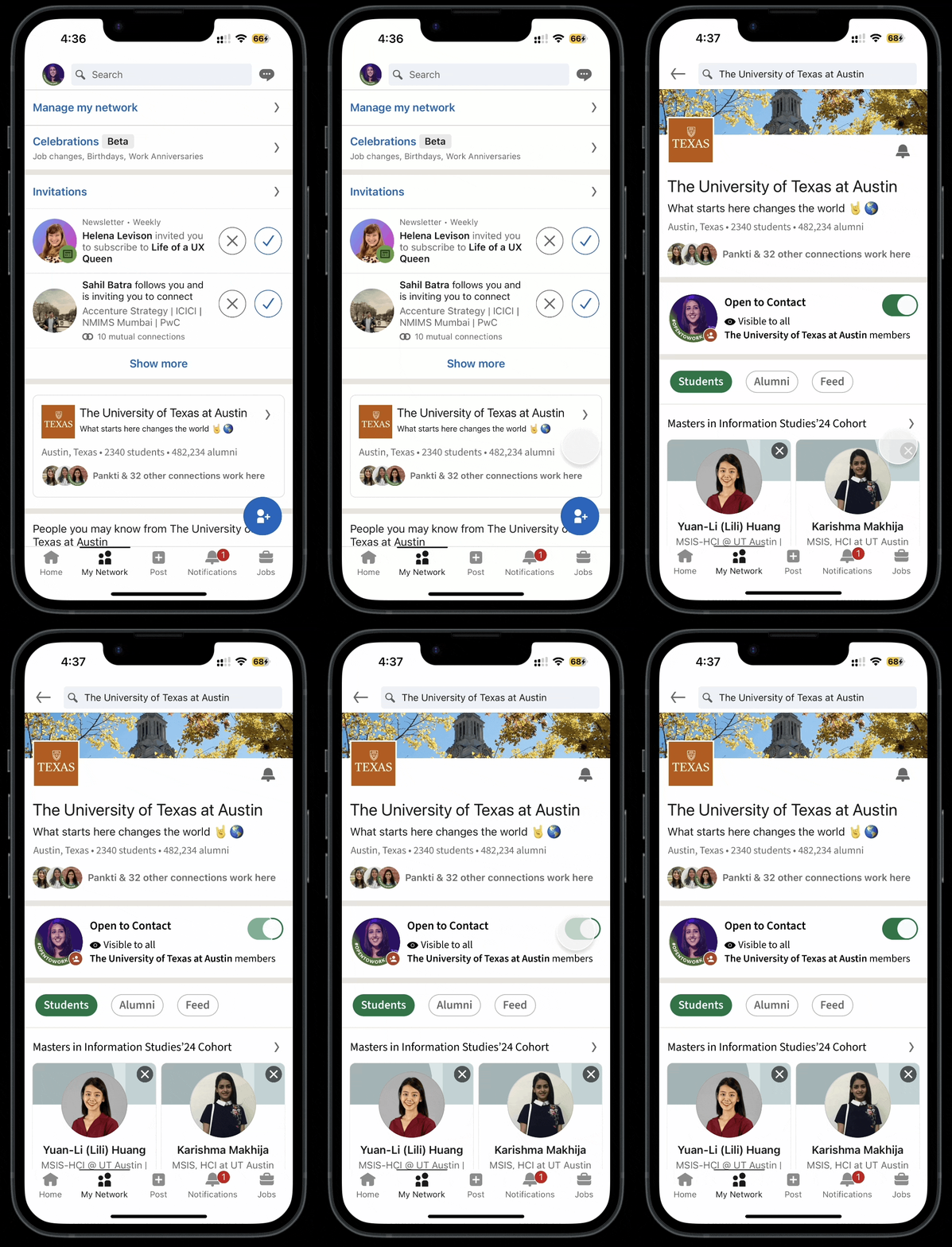
Solution: Open to Connect status
Within the school network, students can toggle their open-to-connect status, making it simpler for others to determine whether they are available for conversation.
As part of LinkedIn's branding, I wanted to create an Open to Connect banner, but doing so would have required me to remove my equally significant "open to work" banner.
#4: How might help students explore and learn better?
Solution: Course network
The students can add their specific courses after the School verifies them, and once inside the course group, they can connect with other students taking the same course. Students in that course can benefit from using LinkedIn learning to help them learn from it.
“LinkedIn Learning” could get access to the school course structure and improvise on their content.
4. Test
User testing was done on two students
• An undergraduate computer science student in India
• A graduate student pursuing a master's degree in information studies
They regarded the features as excellent and desirable as a whole. They did, however, provide the following feedback:
1. Advanced search filters: LinkedIn could allow students to search for alumni by major, graduation year, and other criteria to make it easier for them to find relevant connections.
2. Virtual Mentorship Program: A virtual mentorship program, where students can connect with similar alumni in their field of interest and gain valuable industry insights and advice.

Learnings & Reflections
This project required me to think outside the box in order to add new features to an existing product. This process assisted me in challenging my problem-solving abilities in order to find solutions to complex problems.
The value of iterative processes: I attempted to hone and enhance the project in response to feedback or new information. Trial and error is the key to the iterative process; as a result of these adjustments, the project improves over time.
I learned the abilities necessary to think creatively and diligently to meet deadlines.
If I had more time, I would have incorporated feedback from user testing into my designs and researched more on existing products on the market that provide such features.
In the future
Hyperlocal interactions
Hyperlocal interactions are those that take place exclusively within a small geographic area, such as a neighborhood or community.
To promote social interactions between students as well as interactions between people and local businesses or other organizations, this can be added to LinkedIn school networks. In turn, this would encourage students to interact with one another and avoid feeling overawed when they actually meet. Building community cohesion and a sense of belonging can benefit greatly from these interactions.
bottom of page